Put Your Uppies to Work
August 18, 2026
Within the next week, players will be able to assign eligible Uppies to their properties and have them automatically care for plants on those properties. You will still need to feed your plants, but your assigned Uppies will handle their ongoing care.
This is a major step forward for Upland. It gives Uppies real gameplay utility, gives properties another meaningful purpose, and connects Life, property ownership, and Uppies in one shared system for the first time.
With Troves coming soon, caring for plants will matter even more. All plants in Upland are planned to produce Troves when the Troves system launches, making the Life you maintain today part of Upland’s future collection and progression gameplay.
What Uppie Automation Does
Any Uppie that is Level 3 or higher can be assigned to one of your properties. Once assigned, that Uppie will automatically care for the plants on that property.
The core loop is simple:
- Assign an eligible Uppie to a property.
- Keep feeding the plants on that property.
- Your Uppie handles their ongoing care, through petting, automatically.
This removes a major piece of plant-management busywork while rewarding players who have collected and leveled up their Uppies.
How to Assign an Uppie
We have also cleaned up the property card to make its most important actions easier to find. Sell, Build, Arrange, and Assign Uppie will now live together under Manage, creating a cleaner and more intuitive property experience.
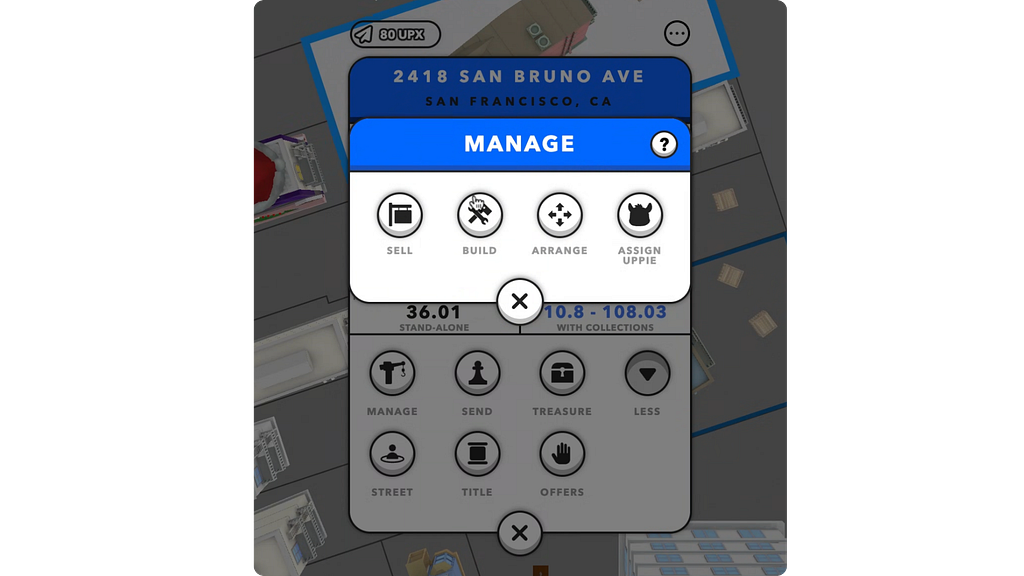
To assign an Uppie:
- Open the property card for the property you want to manage.
- Select Manage.
- Select Assign Uppie.
- Browse or search your eligible Level 3 or higher Uppies.
- Select the Uppie you want, choose Assign, and confirm the assignment.
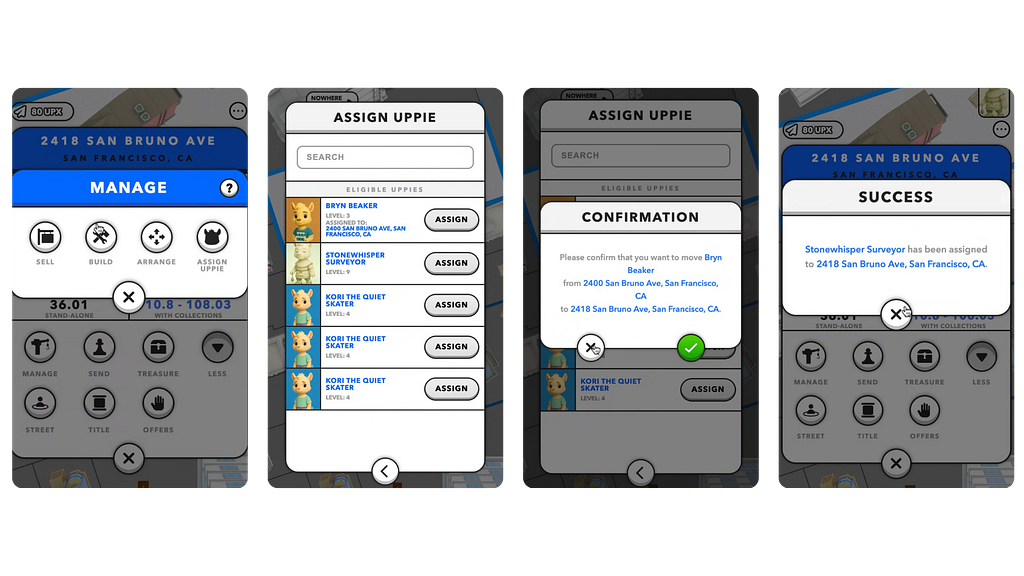
If an Uppie is already assigned, its current property address will appear in the assignment screen. You can also move that Uppie to a different property if you choose.
After an Uppie is assigned, you can check the assignment in two places:
- Open your Asset Wallet and select Uppies to see which property each Uppie is assigned to.
- Open the property card and select the Uppie indicator in the upper-right corner to see the assigned Uppie and its details.
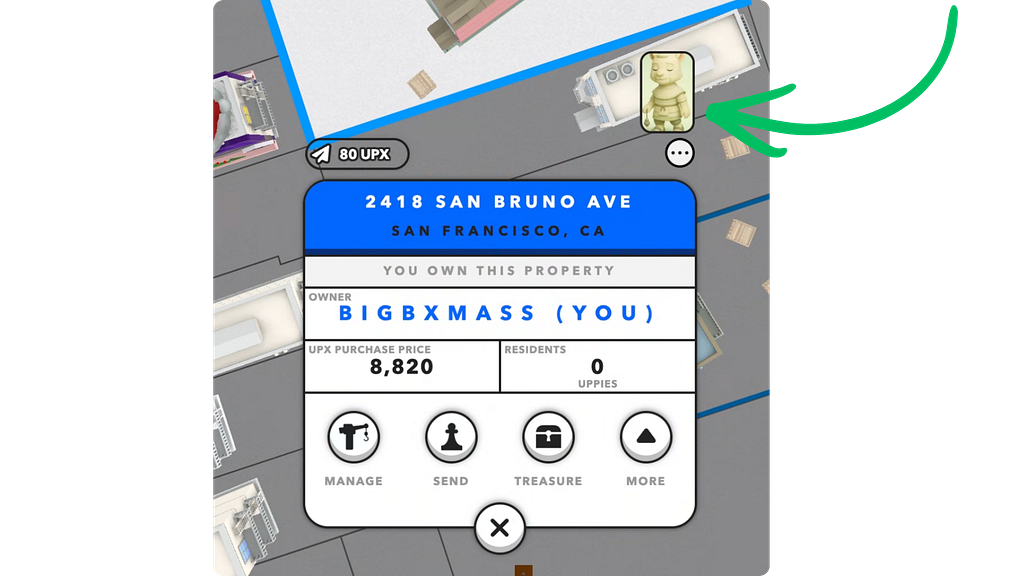
There are a few important details to know before assigning an Uppie:
- Only Level 3 or higher Uppies are eligible for property assignment.
- An assigned Uppie becomes unavailable for merging, sale, or swap while it remains assigned to a property.
- If a property is sold or swapped while an Uppie is assigned, the Uppie will remain with its original owner.
- An assigned Uppie becomes unavailable for merging while it remains assigned to a property.
- Plants that are already unwell will not become healthy immediately. As they are fed and cared for, their wellness will recover gradually over time.
- Plants may still take random damage. As long as an Uppie remains assigned and the plants continue to be fed, the Uppie’s automated care will help them recover.
- Feeding is not automated. Players are still responsible for feeding their plants.
More Uppies Are Coming
Another Uppie sale is coming this week to help players prepare for property assignment. Whether you need your first Uppies or want more options to merge toward Level 3 and above, this is your chance to get ready.
Registration Opens: Thursday, August 20 at 9 AM PT
Sale Begins: Friday, August 21 at 9 AM PT
Launching Within the Next Week
Uppie property assignment and plant care automation will go live in Upland within the next seven days. We will announce the exact launch day as soon as the feature is ready.
Uppies are ready to do more. Properties are ready to come alive. Automation is almost here!
Get your properties ready, level up your Uppies, and stay tuned for the launch and upcoming Uppie sale.